Google Indexing API · IndexNow
Bulk indexing for Google, Bing and Yandex
Submit a whole list of URLs instead of clicking Request indexing one page at a time — through the Google Indexing API with your own service account, and through IndexNow for Bing, Yandex, Naver and Seznam. No third-party indexing service in the middle.
- Google Indexing API
- ~200 URLs/day per project
- IndexNow
- Up to 10,000 URLs/day
- Reaches
- Google · Bing · Yandex · Naver · Seznam
- Scaling
- Multiple service accounts supported
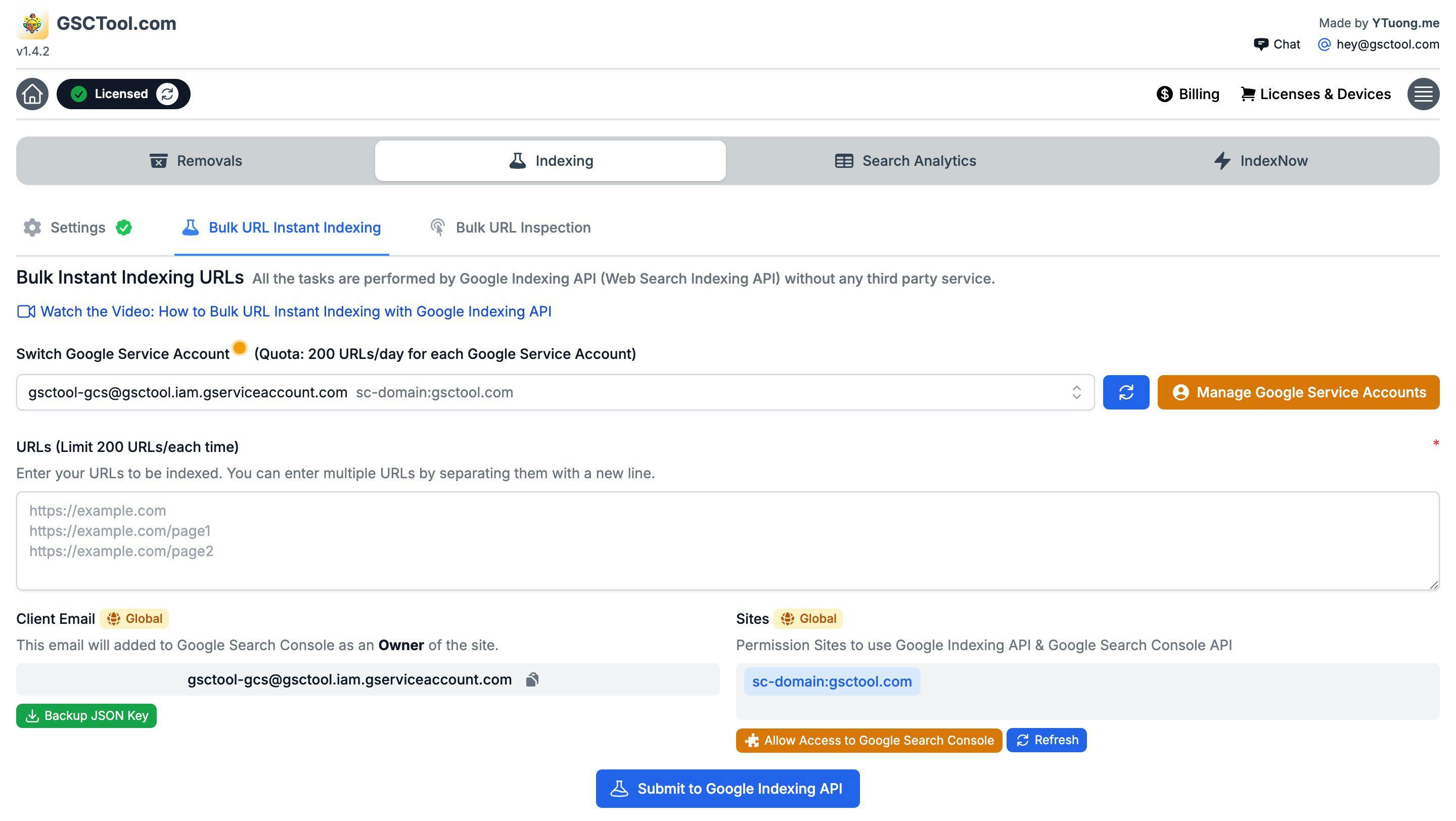
Two different pipes: the Indexing API and IndexNow
Bulk submission is not one thing. Google and the rest of the search engines accept URLs through completely different channels, with different rules, and a tool that pretends otherwise will waste your quota.
- Google Indexing API
- Takes URLs directly from your own Google Cloud service account, roughly 200 URLs a day per project. Google documents it for pages with JobPosting or BroadcastEvent markup; in practice SEOs use it more widely to nudge a crawl. Treat it as a crawl request, never as a guarantee of indexing.
- IndexNow
- One submission reaches Microsoft Bing, Yandex, Naver and Seznam.cz at once, up to 10,000 URLs a day. It is an open protocol with no quota games and no service account — and Google is not part of it.
Submitting a URL asks a search engine to look. Whether it indexes what it finds still depends on the page. Bulk submission accelerates discovery of good pages; it does not rescue thin ones.
When bulk submission earns its place
The honest use cases are the ones where discovery, not quality, is the bottleneck:
- A migration or a relaunch
- Thousands of new URLs appear at once and you do not want to wait for the crawler to work through them at its own pace.
- A large content update
- You rewrote 400 product descriptions; the pages already rank, and you want the new version reflected sooner.
- Fresh, time-sensitive pages
- Listings, events, news-adjacent content where the value drops sharply with every day it is not in the index.
- Pages that keep sitting in "Discovered — currently not indexed"
- Google knows the URL exists but has not crawled it. A submission is one of the few levers you have.
What the extension handles for you
The setup that stops most people is the Google Cloud side: a project, an API, a service account, a JSON key, and permissions on the property. GSCTool does not remove those steps, but it does the part that is genuinely tedious — holding the key, batching the URLs, pacing the requests, and telling you exactly which ones failed.
- Multiple service accounts
- The Indexing API quota is per project. Add more than one service account and the extension spreads the batch across them, which is how large sites get past a single project’s daily ceiling.
- IndexNow without the plumbing
- No key file to host, no endpoint to build — submit the same list to Bing, Yandex, Naver and Seznam from the same panel.
- CSV in, CSV out
- Import the URLs, export the outcome. Errors are listed rather than swallowed, so a retry is a filter away.
- Set up once, index forever
- The key is stored in your browser. After the first setup, submission is paste-and-go.
Do this first, or the submission is wasted
Every URL you submit should already be crawlable and worth indexing. Before a bulk run, confirm the page returns 200, is not blocked in robots.txt, has no noindex tag, canonicalises to itself, and is linked from somewhere on the site. A URL that fails any of those will be fetched and dropped — and you will have spent quota to learn nothing.
The fastest way to check all of that across a list is bulk URL inspection, which is the other half of this toolkit.
How to submit URLs to Google in bulk
The Google Cloud setup is one-time. After that, a batch takes about as long as pasting the list.
Install GSCTool
Add the extension from the Chrome Web Store in Chrome, Edge, Brave or Opera.
Create a Google Cloud project and enable the Indexing API
In the Google Cloud console, create a project and enable the Web Search Indexing API for it.
Create a service account and download the JSON key
Add a service account to the project and generate a JSON key. This file is what authorises the submissions.
Add the service account as an owner in Search Console
Copy the service-account email into Search Console as an owner of the property. Google rejects Indexing API calls from accounts that do not own the site.
Load the key into the extension
Paste the JSON key into GSCTool once. Add a second or third service account here if you need more than one project’s daily quota.
Paste the URLs and submit
Import a CSV or paste the list, then submit. The extension paces the batch, tracks progress, and lists failures separately.
Submit the same list to Bing, Yandex, Naver and Seznam
Switch to IndexNow and send the batch again — no key, no quota juggling, up to 10,000 URLs a day.
Bulk Indexing: frequently asked questions
Something not covered here? Email [email protected].
How many URLs can I submit to the Google Indexing API per day?
Around 200 per Google Cloud project per day. GSCTool supports multiple service accounts, so larger sites add projects and spread a batch across them instead of hitting one ceiling.
Does submitting a URL guarantee it gets indexed?
No, and any tool that promises this is selling something. Submission asks the search engine to crawl the URL. Whether it indexes the page depends on the page — its content, its duplicates and its internal links.
Is the Google Indexing API allowed for normal pages?
Google documents the Indexing API for pages with JobPosting or BroadcastEvent structured data. Many SEOs use it more broadly and do see crawls triggered, but that is outside the documented use. IndexNow is the fully supported bulk channel for Bing, Yandex, Naver and Seznam.
Does IndexNow work for Google?
No. Google does not participate in IndexNow. Use the Indexing API or a sitemap for Google, and IndexNow for Bing, Yandex, Naver and Seznam — GSCTool does both from one list.
Do I need a service account for IndexNow?
No. IndexNow needs no Google Cloud project and no JSON key, which is why it is usually the first thing people run.
How is this different from “Request indexing” in Search Console?
Request indexing is the manual button in the URL Inspection panel, one URL at a time with a low daily allowance. The Indexing API is a programmatic channel with its own quota, which is what makes batches possible.
Can I use more than one Google service account?
Yes. Adding several service accounts is the supported way to raise the effective daily volume, since the Indexing API quota is counted per project.
Should I submit URLs that are blocked or noindexed?
No — the crawl will be wasted. Check the list with bulk URL inspection first: a URL should return 200, be allowed in robots.txt, carry no noindex tag, and canonicalise to itself before it is worth submitting.
The rest of the toolkit
Bulk URL Removal
Remove hundreds or thousands of URLs from Google Search Console and block them in Bing Webmaster Tools from one CSV.
Bulk URL Inspection
Run the Search Console URL Inspection tool over a whole list of URLs and export which ones are actually indexed.
Export Search Console Data
Break the 1,000-row limit and export every query, page, country and device row from the Search Console API.