Google Search Console & Bing Webmaster Tools
Bulk URL removal for Google Search Console
Search Console removes one URL per dialog. GSCTool turns that into a queue: import a CSV of URLs, choose the removal type, set a delay, and let the job run — then export a report of exactly what was removed. The same list also blocks URLs in Bing Webmaster Tools.
- Input
- CSV import or pasted list
- Removal types
- Temporary removal · Clear cached URL
- Also covers
- Bing Webmaster Tools Block URLs
- API key needed
- No — runs in your console session
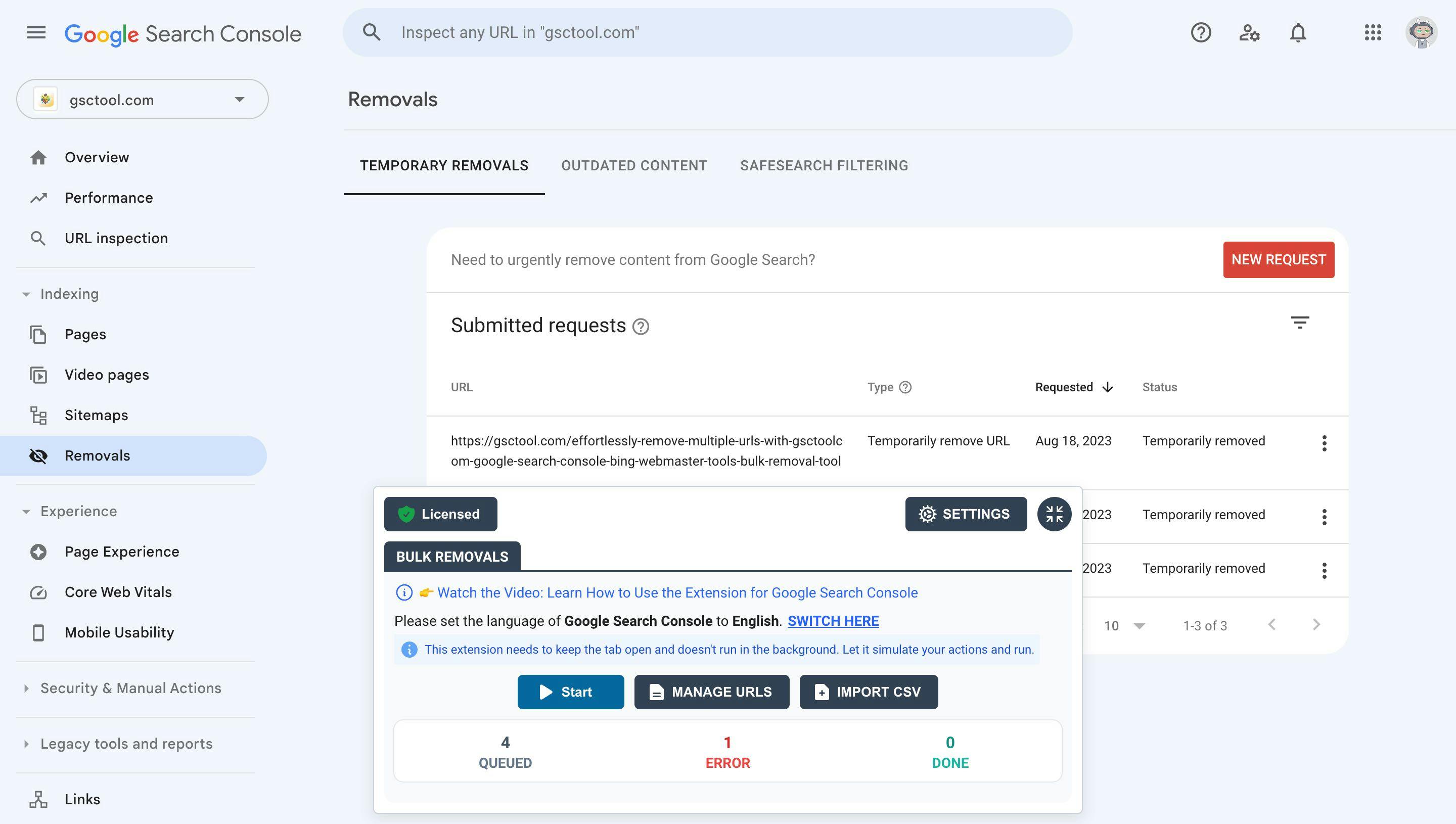
What the Removals tool actually does
The Removals report in Google Search Console hides a URL from Google Search results for about six months. It does not delete the page, it does not change your site, and it does not tell Google the page is gone for good — when the six months are up, the URL comes back unless the page itself now returns a 404 or 410, carries a noindex tag, or sits behind a login.
That makes the tool perfect for emergencies and terrible as a permanent fix. Use it to get something out of the results today, then make the change on your site that keeps it out.
- Temporarily remove URL
- Hides the URL from Search results and clears the cached copy for roughly six months.
- Clear cached URL
- Leaves the page in the results but wipes the cached copy and snippet, so an outdated description or a leaked price stops showing. Google refreshes both on the next crawl.
A removal request is a request about search results, not about your website. Pair every bulk removal with the permanent signal — 404/410, noindex, or authentication — or the URLs return.
When you need to remove URLs in bulk
One URL at a time is fine for one mistake. It stops being fine the moment a site does something at scale, and every one of these is a real support case:
- A hacked site
- Spam injection generates thousands of indexed junk URLs — pharma pages, casino pages, cloaked directories. You need them out of the results while you clean the server.
- A staging site that got indexed
- The dev copy went live without a robots block. Now duplicate versions of every page are competing with production.
- Faceted and parameter URLs
- Filters, sort orders and session IDs multiply into tens of thousands of near-duplicate URLs that eat crawl budget.
- Expired listings, old products, closed job posts
- Pages that must disappear from search the day they expire, in batches, on a schedule.
- Post-migration cleanup
- The old URL structure is still indexed months after the redirects went in, and it is splitting your visibility.
What GSCTool adds on top of Search Console
GSCTool is a Chrome extension: it runs inside your own Search Console session, so there is no third-party service holding your data and nothing to connect but the browser you already use.
- Import a CSV, or paste a list
- One URL per row. The queue takes hundreds of URLs and works through them while you do something else.
- A delay you control
- Requests are paced instead of fired all at once, which is what keeps a long job from tripping Google’s rate limits.
- Removal type per job
- Choose Temporary removal or Clear cached URL for the whole batch.
- Progress you can watch and resume
- Removed, pending and errored counts update as the job runs, so a failure is visible instead of silent.
- Export the result
- Download a CSV of what happened — the record you hand to a client or attach to a ticket.
- Search, filter and sort your list
- Find the URLs you need inside a big import without leaving the panel.
Bing Webmaster Tools, in the same pass
Bing has the same problem and the same one-at-a-time interface. GSCTool drives the Block URLs tool in Bing Webmaster Tools from the same kind of CSV, so a cleanup covers both engines instead of only the one people remember.
The Bing side needs no API key: like the Search Console removals, it works through the console you are already signed in to.
How to bulk remove URLs from Google Search Console
Ten minutes of setup, then the queue runs on its own. You need verified ownership of the property in Search Console — nothing else.
Install the extension
Add GSCTool from the Chrome Web Store. It works in Chrome and other Chromium browsers such as Edge, Brave and Opera.
Prepare your list of URLs
Put one full URL per row in a CSV, or copy the list to your clipboard. Export from a crawl, from your CMS, or from the Search Console Pages report.
Open the Removals report
Sign in to Search Console, pick the property that owns those URLs, and open Indexing → Removals. The GSCTool panel appears alongside it.
Import the URLs and pick a removal type
Import the CSV or paste the list, then choose Temporarily remove URL or Clear cached URL for the batch.
Set a delay and start the job
A short delay between requests keeps a large batch inside Google’s limits. Start the queue and leave the tab open.
Watch it run, then export the report
Removed, pending and errored counts update live. When the job finishes, export the CSV and retry any errors.
Make the removal permanent
Removals expire after about six months. Return 404 or 410 for the URLs, add a noindex tag, or put them behind a login, so they do not come back.
Bulk URL Removal: frequently asked questions
Something not covered here? Email [email protected].
How do I remove more than one URL at a time in Google Search Console?
Search Console itself has no bulk mode — the Removals report accepts one URL per dialog. GSCTool adds a queue on top of it: import a CSV or paste a list, choose the removal type, and the extension submits the requests one after another with a delay you set, showing progress as it goes.
Does removing a URL delete the page from my website?
No. A removal only affects what Google shows in search results. The page stays on your server and keeps working for anyone with the link.
How long does a removal last?
About six months. After that the URL can reappear in search results unless the page returns 404 or 410, carries a noindex tag, or requires authentication. Treat the removal as the emergency stop and the site change as the fix.
What is the difference between “Temporarily remove URL” and “Clear cached URL”?
Temporarily remove URL hides the page from search results for about six months and clears the cached copy. Clear cached URL leaves the page in the results but drops the cached version and the old snippet, which is what you want when the page still belongs in Google but the description is out of date.
Can I remove URLs from Bing at the same time?
Yes. GSCTool drives the Block URLs tool in Bing Webmaster Tools with the same CSV workflow, so one cleanup covers Google and Bing.
Do I need a Google Cloud project or an API key for bulk removal?
No. Bulk removal runs through the Search Console interface you are already signed in to. A service-account JSON key is only needed for the API-based features: bulk indexing, bulk URL inspection and the full data export.
What should the CSV look like?
One full URL per row, including the protocol — https://example.com/old-page. The URLs must belong to the Search Console property you have open, because that is the property whose removals you are allowed to request.
How many URLs can I remove in one day?
Google applies its own daily limits per property and rate-limits rapid requests. GSCTool paces the queue with a delay you control and reports the URLs that error, so an oversized batch is visible and retryable instead of silently dropped.
The rest of the toolkit
Bulk URL Inspection
Run the Search Console URL Inspection tool over a whole list of URLs and export which ones are actually indexed.
Bulk Indexing
Submit URLs straight to the Google Indexing API, and to Bing, Yandex, Naver and Seznam through IndexNow.
Export Search Console Data
Break the 1,000-row limit and export every query, page, country and device row from the Search Console API.