Google Search Console API
Export Google Search Console data
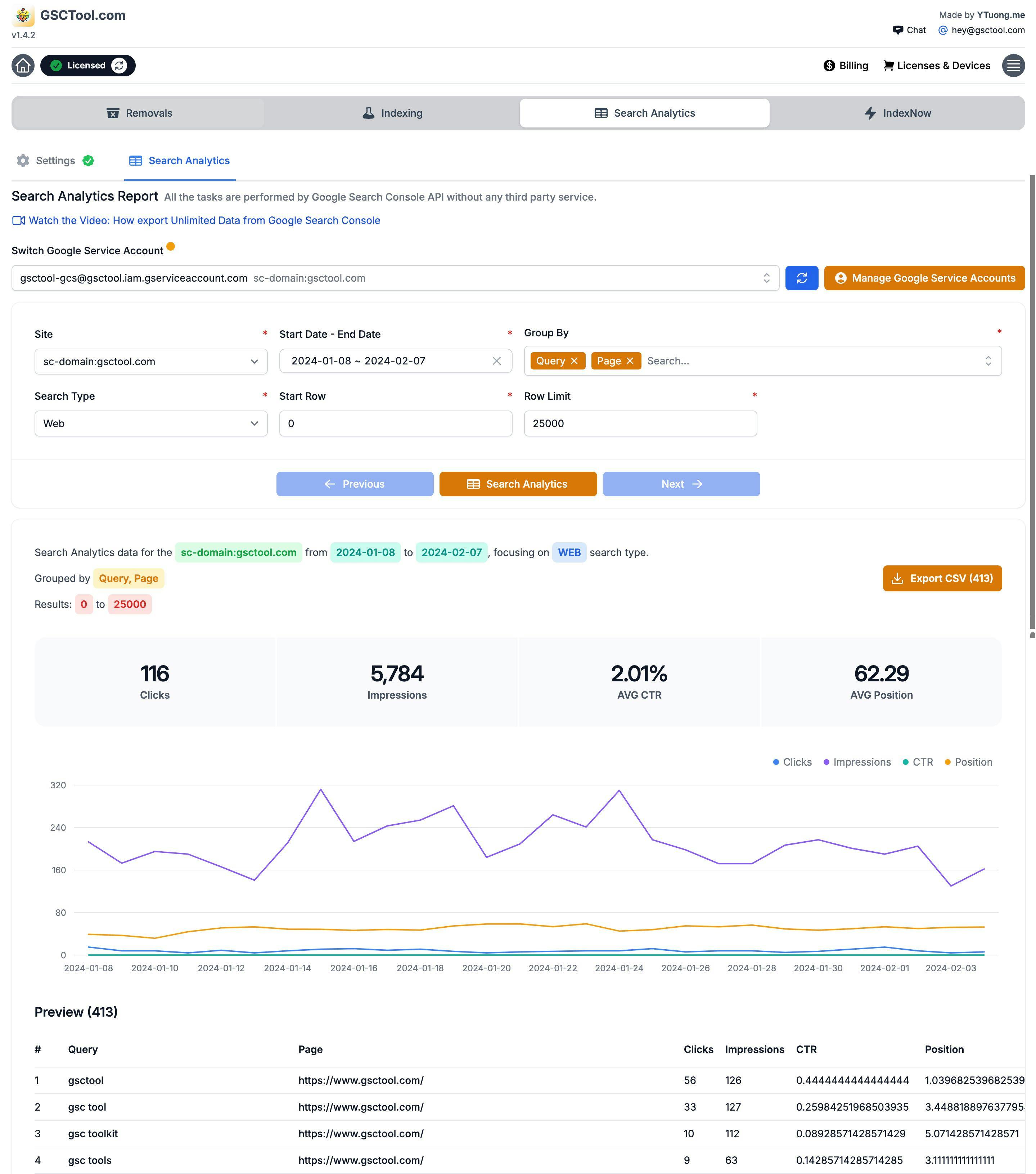
The Performance report exports 1,000 rows. The API behind it does not stop there. GSCTool pages through the whole dataset with your own service account and writes it to CSV — every query, every page, the full 16 months Google keeps.
- Row limit
- None — the API pages through
- History
- Up to 16 months
- Dimensions
- Query · page · country · device · date
- Output
- CSV, written locally
Why your export stops at 1,000 rows
The Performance report in Search Console shows a table, and the export button copies that table. The table is capped at 1,000 rows. That cap has nothing to do with how much data Google holds about your site — it is a limit of the screen, and it quietly hides the long tail where most of the interesting queries live.
The Search Console API has no such cap. It returns the same performance data in pages of rows, which is how a property with 40,000 queries gives you 40,000 queries instead of the top 1,000 sorted by clicks.
The long tail is not a rounding error. On most sites the queries below the top 1,000 hold the majority of impressions — and almost every unanswered content idea.
What you can actually pull
The export covers the dimensions the Performance report offers, and the combinations it does not let you see at once.
- Queries
- Every query Search Console will disclose, with clicks, impressions, CTR and average position — not just the first thousand.
- Pages
- Page-level performance for the whole site, which is what makes a decay audit possible.
- Query × page
- The pairing that exposes cannibalisation: two pages splitting the same query, or a query landing on the page you did not intend.
- Country and device
- Where the traffic is and what it is browsing on, per page rather than per site.
- Dates
- Daily rows across the full 16-month window Google retains — including the months about to roll off it.
What people do with the full export
Once the data is a CSV instead of a screen, the analyses that were impossible become spreadsheet work.
- Keyword research from your own data
- The queries you already appear for, at positions 8 to 30, are the cheapest ranking wins on the site. They are also almost entirely below the 1,000-row cut.
- Cannibalisation audits
- Group by query, count distinct pages, and every conflict in the site sorts itself to the top.
- Decay reports
- Compare this quarter with the last one page by page, and rank the losers by lost clicks rather than by feel.
- Archiving before the 16-month window closes
- Search Console forgets. A monthly export is a year-over-year comparison you will still have next year.
- Feeding a dashboard or a database
- CSV goes into a spreadsheet, a BI tool, or a table you actually query.
How GSCTool does it
The extension calls the Search Console API with your own service-account key, pages through the results, and writes the CSV. Your data goes from Google to your browser — there is no analytics service in between keeping a copy, and no monthly fee attached to the row count.
Setup is the same one-time Google Cloud step used by bulk inspection: a project, the Search Console API, a service account, its JSON key, and that service account added as a user on the property. After that, exporting is a menu away for every property on the account.
How to export all your Search Console data
A one-time API setup, then a full export whenever you need one — no 1,000-row ceiling.
Install GSCTool
Add the extension from the Chrome Web Store and open the Search Console property you want to export.
Create a Google Cloud project and enable the Search Console API
In the Google Cloud console, create a project and enable the Google Search Console API for it.
Create a service account and download the JSON key
Add a service account to the project and generate its JSON key file.
Add the service account to the property
In Search Console, add the service-account email as a user on the property so it is allowed to read the data.
Load the key into the extension
Paste the JSON key into GSCTool once. It is stored in your browser and reused for later exports.
Choose the property, date range and dimensions
Pick the window — up to the 16 months Google retains — and the dimensions you need: query, page, country, device, date, or a combination.
Run the export and open the CSV
GSCTool pages through the API and writes every row to CSV, ready for a spreadsheet, a BI tool or a database.
Export Search Console Data: frequently asked questions
Something not covered here? Email [email protected].
Why is my Google Search Console export limited to 1,000 rows?
The Performance report renders a table capped at 1,000 rows, and the export button exports that table. The API behind the same report is not capped — it returns rows in pages, which is how a full export gets past the limit.
How far back does Search Console data go?
Google retains 16 months of performance data. Anything older is gone, which is why a recurring export is the only way to keep a real year-over-year comparison.
Can I export queries and pages together?
Yes. The query × page combination is available through the API, and it is the view that exposes cannibalisation — two pages competing for one query — which the standard report will not show you directly.
Do I need a Google Cloud service account to export?
Yes. The full export uses the Search Console API, which needs a service account with a JSON key and access to the property. It is the same one-time setup as bulk URL inspection, and the documentation covers each screen.
What format is the export?
CSV, with the metrics as columns: clicks, impressions, CTR and average position, alongside whichever dimensions you selected.
Is my Search Console data sent to your servers?
No. The extension talks to Google directly from your browser using your own key, and writes the file locally. Nothing routes through a third-party service.
How is this different from the Bulk Data Export in Search Console?
Google’s own Bulk Data Export streams daily data into BigQuery, which means a Google Cloud project, a dataset and billing to manage — a strong option if you already run BigQuery. This is the lighter path: a CSV on your machine, on demand, with no warehouse to look after.
The rest of the toolkit
Bulk URL Removal
Remove hundreds or thousands of URLs from Google Search Console and block them in Bing Webmaster Tools from one CSV.
Bulk URL Inspection
Run the Search Console URL Inspection tool over a whole list of URLs and export which ones are actually indexed.
Bulk Indexing
Submit URLs straight to the Google Indexing API, and to Bing, Yandex, Naver and Seznam through IndexNow.